
Is your Vive AC thermostat not working, leaving you frustrated and uncomfortable? When your thermostat fails, it can throw off your entire home’s cooling system, making it hard to stay cool and relaxed.
You might wonder why it stopped responding or what you can do to fix it quickly. This guide will help you understand the common reasons behind the problem and show you simple steps to get your thermostat back in action.
Keep reading to take control of your comfort again without hassle.

Credit: iwae.com
Page Contents
Common Causes Of Thermostat Issues
Thermostats control your home’s temperature. When a Vive AC thermostat stops working, it causes discomfort. Understanding common causes can help fix the problem quickly. Many issues come from simple errors. Some problems need professional help. Let’s explore common reasons why the thermostat may fail.
Power Supply Problems
Thermostats need power to run. A dead battery or loose wires can stop the device. Check if the thermostat screen is blank. A tripped circuit breaker can cut power too. Power issues are often easy to fix. Replace batteries or reset breakers to restore function.
Connectivity Errors
Many Vive thermostats connect to Wi-Fi. If the connection breaks, the thermostat may not respond. Poor Wi-Fi signals or router problems cause errors. Restarting the router can help. Make sure the thermostat is within Wi-Fi range. Connectivity issues stop remote control features.
Incorrect Settings
Wrong settings can confuse your thermostat. The temperature might be set too high or low. Check the mode—heat, cool, or auto. Scheduling errors also cause problems. Reset settings to default if unsure. Correct settings ensure the system runs smoothly.
Firmware Glitches
Firmware controls thermostat functions. Bugs or outdated software can cause glitches. These issues may lead to freezes or wrong readings. Updating firmware often solves these problems. Follow manufacturer instructions for updates. Regular updates keep the thermostat reliable.
Basic Troubleshooting Steps
Basic troubleshooting helps fix common Vive AC thermostat problems fast. It saves time and stops frustration. Start with simple checks to find the cause. Follow these easy steps to get your thermostat working again.
Check Power And Batteries
Make sure the thermostat has power. Check if it is plugged in or has fresh batteries. Dead batteries often cause the device to stop working. Replace old batteries with new ones. Confirm the power switch is on.
Restart The Thermostat
Turn the thermostat off and then back on. This simple reset can clear minor errors. Wait a few seconds before restarting. The device will reboot and may work properly after this.
Verify Wi-fi Connection
Check if the thermostat connects to Wi-Fi. A weak or missing signal stops remote control. Move the router closer or remove obstacles. Restart the router if needed. Ensure the thermostat shows a stable connection.
Inspect Wiring And Installation
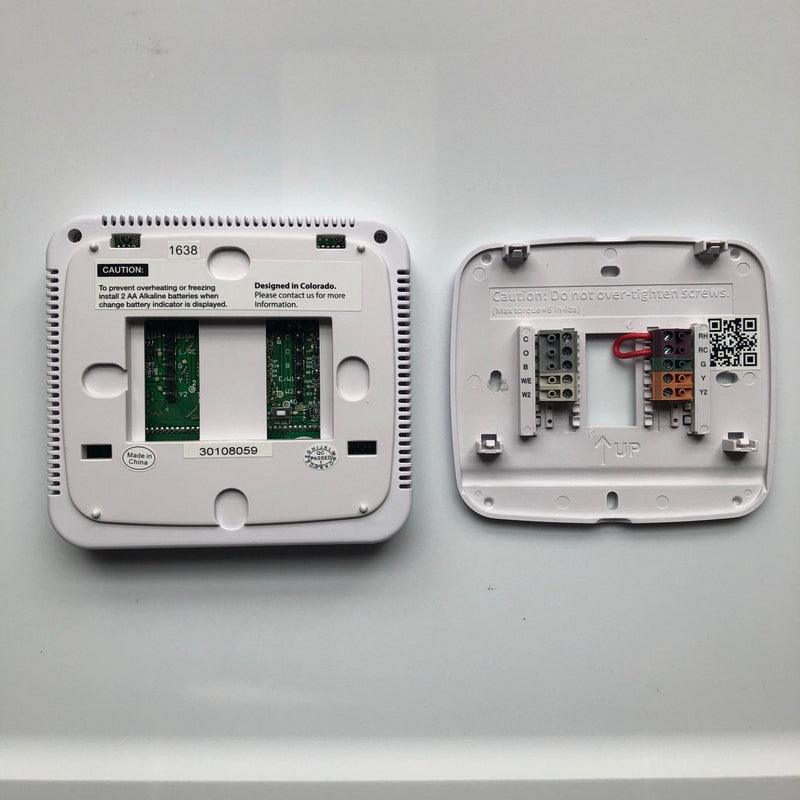
Look at the thermostat wiring carefully. Loose or damaged wires cause failures. Turn off power before checking wires. Tighten any loose connections. Confirm the thermostat is installed correctly on the wall.
Adjusting Thermostat Settings
Adjusting your Vive AC thermostat settings can fix many common issues. Small changes often improve how your system works. Knowing the right steps helps you control your home’s temperature better.
Set Correct Temperature Mode
Check if the thermostat is on the right mode. Modes include cool, heat, or fan. Choose the mode that matches your need. Setting the wrong mode stops the AC from working properly. Use the thermostat buttons or app to change modes.
Calibrate Temperature Sensor
The temperature sensor may give wrong readings. This causes the AC to turn on or off at wrong times. Calibrate the sensor to match the room’s actual temperature. Many Vive thermostats let you adjust sensor settings. Follow the manual for exact steps to calibrate.
Update Schedule And Preferences
Thermostats work best with an updated schedule. Set times when the AC should run or stop. Adjust preferences for weekdays and weekends. This saves energy and keeps your home comfortable. Regularly review and update your schedule for best results.
Credit: value-controls.com
Resetting The Vive Ac Thermostat
Resetting your Vive AC thermostat can solve many common issues. It clears temporary glitches and helps the device work properly again. You can try two types of resets: a soft reset and a factory reset. Each method has its own steps and results. Choose the one that fits your problem best.
Soft Reset Procedure
A soft reset restarts the thermostat without erasing your settings. This step fixes minor bugs quickly. Start by turning off the thermostat. Wait for about 10 seconds to let it power down completely. Press the power button again to turn it back on. Check if the thermostat is working correctly after the restart.
Factory Reset Steps
A factory reset restores the thermostat to its original settings. This step erases all your custom settings and saved schedules. Begin by locating the reset button on the device. Use a small pin or paperclip to press and hold the reset button. Hold it for about 10 seconds until the screen goes blank. Release the button and wait for the thermostat to restart. Set up your thermostat again as new after the reset.
When To Contact Support
Knowing when to contact support for your Vive AC thermostat saves time and frustration. Some problems need expert help. Others can be fixed at home. This section guides you on spotting issues that need professional care.
Identifying Hardware Failures
Hardware problems often cause the thermostat to stop working. Signs include a blank screen or no response to buttons. Strange noises or overheating also point to hardware failure. If your thermostat won’t turn on or reset, it likely needs repair. Do not try to open the device yourself. Contact support to avoid further damage.
Warranty And Service Options
Your Vive AC thermostat may still be under warranty. Check the purchase date and warranty terms. Support can help with repairs or replacements under warranty. Some issues might be covered for free. Others may require a service fee. Contact support to learn about your options. Keep your receipt and product details ready to speed up the process.
Preventive Tips For Smooth Operation
Keeping your Vive AC thermostat working well saves time and money. Small steps help avoid problems and ensure comfort. Follow these simple tips for smooth operation and fewer breakdowns.
Regular Maintenance Routine
Check the thermostat and AC system often. Clean dust and dirt around sensors. Replace batteries yearly. Test the system monthly to spot issues early. A clean thermostat works better and lasts longer.
Software Updates
Update your thermostat’s software regularly. Updates fix bugs and improve performance. Use the official app or website to get the latest version. Staying current helps avoid glitches and keeps your device running smoothly.
Proper Installation Practices
Install the thermostat away from direct sunlight and drafts. Avoid placing it near heat sources like ovens or lamps. Ensure wiring is secure and follows the manual. Correct installation prevents errors and improves accuracy.

Credit: iwae.com
Frequently Asked Questions
Why Is My Vive Ac Thermostat Not Responding?
Your Vive AC thermostat may not respond due to power issues, incorrect wiring, or a drained battery. Check power supply, reset the device, and replace batteries if needed. Ensure proper Wi-Fi connection for smart models.
How To Fix Vive Ac Thermostat Connectivity Issues?
Restart your router and thermostat to fix connectivity issues. Check Wi-Fi signal strength and update the thermostat firmware. Avoid interference from other devices and ensure the thermostat is within range of the network.
What Causes Vive Thermostat Display To Go Blank?
A blank display often results from dead batteries, power supply failure, or internal faults. Replace batteries and check circuit breakers. If the issue persists, contact Vive support for further diagnostics.
Can A Vive Thermostat Calibration Affect Ac Performance?
Yes, improper calibration can cause inaccurate temperature readings and poor AC performance. Recalibrate the thermostat using the manufacturer’s instructions to ensure accurate control of your HVAC system.
Conclusion
Fixing your Vive AC thermostat may take some simple steps. Check batteries and wiring first. Restart the device to clear minor glitches. Clean sensors to improve accuracy. If problems persist, contact a technician. Regular maintenance helps avoid future issues. A working thermostat keeps your home comfortable and saves energy.
Don’t ignore warning signs or delays in response. Small actions can restore your AC’s performance quickly. Stay patient and follow these tips for best results.