
Is your thermostat blank and your AC not working? It’s frustrating when your home won’t cool down, especially when the heat feels unbearable.
You might wonder what’s wrong and how to fix it fast. Don’t worry—you’re not alone, and there are simple reasons behind this problem that you can learn about right now. Keep reading to discover easy steps to get your thermostat and AC back on track, so you can enjoy cool comfort again without stress.

Credit: www.reddit.com
Page Contents
Common Causes Of Thermostat Blank Screen
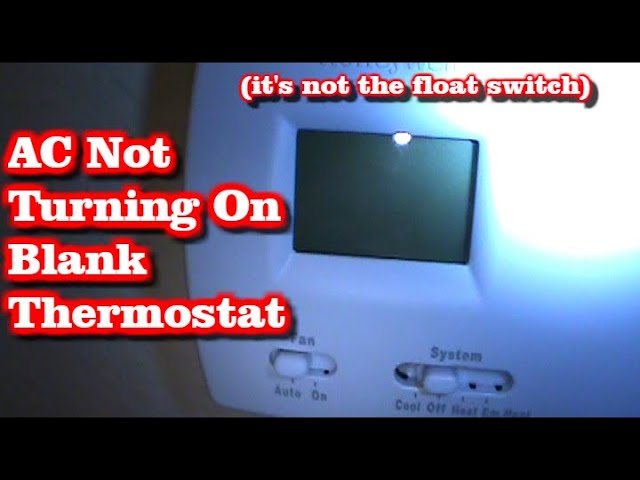
A thermostat with a blank screen can stop your air conditioner from working. This problem often causes confusion and discomfort. Knowing the common reasons helps fix the issue faster. Many times, the cause is simple and easy to repair. Below are the main reasons why the thermostat screen goes blank.
Power Supply Issues
The thermostat needs power to show information and control the AC. A power outage or tripped circuit breaker can cut off electricity. Loose connections in the power source also cause the screen to go blank. Always check the home’s power first when the screen is blank.
Faulty Wiring
Wires connect the thermostat to the heating and cooling system. Broken or damaged wires stop the thermostat from getting signals. Poor wiring during installation can cause failure over time. Inspect the wiring carefully to find any visible damage or loose ends.
Dead Batteries
Many thermostats use batteries to operate. Old or dead batteries cause the screen to turn off. Replacing batteries is a quick fix for a blank screen. Always keep spare batteries handy to avoid downtime.
Screen Malfunction
The screen itself can fail due to wear or manufacturing defects. Cracked or damaged displays stop showing information. Internal faults in the screen’s hardware also cause blank displays. In this case, replacing the thermostat might be necessary.
Credit: www.youtube.com
Troubleshooting Ac Not Working
When the air conditioner stops working, it can make your home uncomfortable. Troubleshooting the issue helps find simple fixes. Many problems come from easy-to-check parts. Start with basic checks before calling a technician.
Checking Thermostat Settings
Make sure the thermostat is set to “cool” mode. Check the temperature setting; it should be lower than the room temperature. Replace batteries if the thermostat is blank or not responding. Reset the thermostat by turning it off and on again.
Inspecting Circuit Breakers
Look at your home’s electrical panel for tripped breakers. Flip the breaker off and then on to reset it. A tripped breaker can cut power to the AC unit. If it trips again, call a professional electrician.
Examining Air Filters
Dirty air filters block airflow and strain the system. Remove and inspect the filter for dust and debris. Replace or clean the filter if it looks clogged. Regular filter changes improve AC efficiency and air quality.
Assessing Outdoor Unit
Check the outdoor condenser unit for dirt, leaves, or debris. Clear any obstructions around the unit to ensure good airflow. Listen for unusual noises indicating mechanical issues. Turn off power before cleaning the outdoor unit.
Quick Fixes For Thermostat Blank Screen
A blank thermostat screen can stop your AC from working properly. Quick fixes can help you solve this issue fast. These simple steps often restore your thermostat’s display and functionality.
Check these easy methods before calling a professional. They save time and money. Let’s explore some quick fixes for a thermostat blank screen.
Resetting The Thermostat
Start by resetting your thermostat. This clears minor glitches. Find the reset button or power off the device for a few minutes. Turn it back on and check the screen. A reset often restores the display and function.
Replacing Batteries
Many thermostats use batteries to power the screen. Dead batteries cause a blank display. Open the thermostat cover and remove old batteries. Replace them with fresh ones. Ensure the batteries fit correctly. This simple step often brings the screen back to life.
Inspecting And Reconnecting Wires
Loose or disconnected wires can cause screen problems. Turn off the power to your thermostat. Remove the cover and check all wire connections. Tighten any loose wires carefully. Reconnect any wires that have come off. Secure wiring ensures proper power flow and screen function.
Easy Solutions For Ac Malfunctions
Easy solutions often fix common AC problems fast. These simple steps help your system work well again. No need to call a technician right away. Try these tips first to save time and money.
Cleaning Or Replacing Air Filters
Dirty air filters block airflow and reduce cooling. Clean the filters every month during heavy use. If filters are old, replace them with new ones. This keeps air clean and the AC running smoothly.
Resetting The Ac Unit
Resetting the AC can fix minor electrical issues. Turn off the unit and unplug it for a few minutes. Plug it back in and turn it on. This refreshes the system and can restore normal function.
Clearing Debris Around Outdoor Unit
Leaves, dirt, and grass can block the outdoor unit. Clear debris from around the unit carefully. Keep at least two feet of space free for airflow. This helps the AC cool better and last longer.
When To Call A Professional
Knowing when to call a professional for thermostat and AC issues saves time and prevents damage. Some problems need special tools and skills. Trying to fix these can be risky and might make things worse. A trained technician can diagnose and repair complex issues safely and quickly.
Complex Electrical Problems
Thermostats and AC units have many electrical parts. Faulty wiring or blown fuses can cause the thermostat to blank out or the AC to stop working. Diagnosing these issues requires knowledge of electrical systems. A professional can safely test and fix wiring problems. They also prevent electrical hazards that may cause injury or fire.
Refrigerant Issues
Refrigerant helps cool your home. Low or leaking refrigerant can cause the AC to stop working properly. Handling refrigerant needs special training and tools. Only certified technicians can add or fix refrigerant safely. Incorrect handling can harm the environment and damage your AC system.
Compressor Failures
The compressor is the heart of the AC system. If it fails, the AC stops cooling. Repairing or replacing a compressor is complex and expensive. It requires a professional with experience and the right equipment. Attempting this repair alone can lead to more damage and higher costs.

Credit: www.youtube.com
Preventive Tips To Avoid Future Issues
Preventing thermostat blank screens and AC failures starts with smart care. Small actions today stop big problems tomorrow. Follow easy tips to keep your system running smoothly. Save time, money, and stress with simple steps.
Regular Maintenance Schedules
Check your thermostat and AC regularly. Clean dust and dirt from vents and filters. Replace old filters every 1-3 months. Schedule professional service twice a year. Early repairs catch small issues before they grow. Regular care extends the life of your system.
Proper Thermostat Placement
Place the thermostat in a central room, away from heat sources. Avoid direct sunlight and drafts. Keep it away from windows and doors. Proper placement ensures accurate temperature readings. This helps your AC work efficiently and prevents errors.
Upgrading To Smart Thermostats
Smart thermostats learn your schedule and adjust settings automatically. They send alerts for maintenance or malfunctions. Some models control your AC remotely with a phone app. Upgrading improves comfort and saves energy. Smart thermostats reduce chances of blank screens and failures.
Frequently Asked Questions
Why Is My Thermostat Blank And Ac Not Working?
A blank thermostat usually means no power is reaching it. Check your circuit breaker and batteries. If power is fine, wiring or thermostat failure might be the cause.
How Can I Fix A Blank Thermostat Display?
First, replace the thermostat batteries if applicable. Next, reset the breaker or fuse. If still blank, inspect wiring connections or consider professional repair.
Can A Thermostat Cause The Ac To Stop Working?
Yes, a faulty thermostat can prevent the AC from turning on. It controls the system’s operation, so malfunctions disrupt cooling.
What Should I Check If Ac Won’t Cool But Thermostat Works?
Check the AC unit’s power supply and air filters. Dirty filters or electrical issues can stop cooling despite a working thermostat.
Conclusion
A blank thermostat and a non-working AC can be frustrating problems. Checking the power supply and batteries often helps. Sometimes, resetting the thermostat fixes the issue quickly. Cleaning or replacing filters improves performance too. If problems continue, calling a professional is wise.
Regular maintenance keeps your system running smoothly. Don’t ignore small signs; they save big repairs later. Stay calm and follow these simple steps to restore comfort. Your home should feel cool and cozy again soon.