
Is your Honeywell AC thermostat not cooling your home like it should? It’s frustrating when you expect cool air, but your thermostat just won’t deliver.
You rely on your AC to keep things comfortable, especially during hot days. When it stops working, it can leave you feeling stuck and uncomfortable. But don’t worry—there are simple reasons why this happens and easy fixes you can try right now.
Keep reading, and you’ll learn exactly what to do to get your Honeywell thermostat cooling again fast.

Credit: allurelakestorey.com
Page Contents
Common Causes Of Honeywell Ac Thermostat Not Cooling
Honeywell AC thermostats sometimes stop cooling properly. Several common problems cause this issue. Understanding these causes helps in quick troubleshooting and fixing.
Many issues relate to the thermostat itself or the AC system. Identifying the exact problem saves time and money. Here are the main reasons your Honeywell AC thermostat might not cool.
Power And Wiring Issues
Power problems often stop the thermostat from working. Loose or damaged wires can cut the power supply. Check the circuit breaker and wiring connections. A dead battery can also cause the thermostat to fail.
Incorrect Thermostat Settings
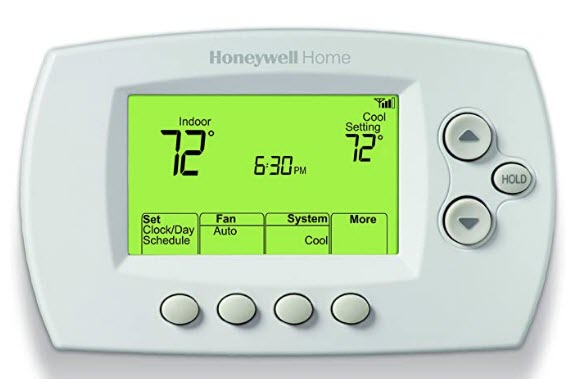
Wrong settings cause no cooling. The thermostat might be set too high or on the wrong mode. Ensure it is set to “Cool” and the temperature is below room temperature. Sometimes, the fan setting affects cooling too.
Dirty Air Filters
Clogged air filters block airflow. Poor airflow stops cool air from circulating. Replace or clean filters regularly to maintain airflow. Dirty filters strain the AC and reduce cooling efficiency.
Refrigerant Problems
Low refrigerant levels reduce cooling power. Leaks in the refrigerant line cause this issue. The system cannot cool properly without enough refrigerant. A professional should check and refill refrigerant if needed.
Sensor And Calibration Errors
The thermostat sensor detects room temperature. If it is faulty or out of place, cooling stops. Calibration errors make the thermostat read wrong temperatures. Adjusting or replacing the sensor fixes this problem.
Basic Troubleshooting Steps
Basic troubleshooting helps fix common Honeywell AC thermostat cooling issues. It saves time and avoids unnecessary repairs. Follow these simple steps to check your thermostat and AC system.
Checking The Power Supply
Ensure the thermostat is powered on. Check the circuit breaker or fuse box. Reset any tripped breakers or replace blown fuses. Inspect the thermostat batteries if it uses them. Low or dead batteries can stop the thermostat from working.
Resetting The Thermostat
Resetting can fix minor software glitches. Find the reset button or remove the thermostat from its base. Wait 30 seconds, then reattach it. Some models require pressing a combination of buttons. Consult your Honeywell manual for details.
Adjusting Temperature Settings
Check the temperature setting on the thermostat. Set it lower than the current room temperature. Avoid setting it too low, which stresses the AC. Confirm the mode is set to “Cool.” Incorrect mode can prevent cooling.
Replacing Air Filters
Dirty air filters reduce airflow and cooling efficiency. Locate the filter in your AC system or return air vent. Remove and inspect it. Replace the filter if it looks clogged or dirty. Clean filters improve AC performance and air quality.
Advanced Fixes For Cooling Problems
Advanced fixes can solve deeper problems with your Honeywell AC thermostat. These steps go beyond simple checks. They help restore proper cooling and improve comfort.
Try these fixes carefully. They require some technical knowledge but are easy to follow with clear instructions.
Inspecting The Wiring Connections
Loose or damaged wires can stop the thermostat from working well. Turn off power before starting. Check all wires connected to the thermostat and AC unit. Look for signs of wear or loose ends. Tighten any loose connections. Replace wires if you see damage. This can fix communication problems between the thermostat and AC.
Recalibrating The Thermostat
Sometimes the thermostat shows wrong temperatures. This makes the AC run less efficiently. Find the calibration option in your thermostat menu. Follow the instructions to adjust the temperature reading. Use a reliable thermometer to compare. Correct calibration helps the AC turn on and off at the right times.
Cleaning The Outdoor Unit
Dirt and debris can block airflow in the outdoor unit. Turn off the power before cleaning. Remove leaves, grass, and dust from around the unit. Use a soft brush or hose to clean the fins gently. Clean fins allow better heat exchange. This helps the AC cool your home more effectively.
Checking Refrigerant Levels
Low refrigerant means poor cooling. A professional should check this for safety. If levels are low, it may mean a leak. Fixing leaks and refilling refrigerant restores cooling power. Do not try to handle refrigerant yourself. Proper levels are key for efficient AC performance.

Credit: www.suyogrubber.com
When To Call A Professional
Sometimes, fixing a Honeywell AC thermostat that won’t cool needs expert help. Knowing when to call a professional saves time and prevents damage. Certain problems require special tools and skills. Trying to fix these issues alone can be risky and costly. Below are key signs that a professional’s help is necessary.
Persistent Cooling Issues
If your AC keeps failing to cool after basic checks, call a technician. A professional can find hidden problems affecting performance. They use advanced tools to diagnose issues quickly. Persistent cooling failure often signals deeper system faults. Acting fast can prevent bigger repairs later.
Handling Refrigerant Safely
Refrigerant is essential for cooling but requires careful handling. Only certified technicians can add or fix refrigerant safely. Incorrect handling can harm the environment and your health. Professionals follow strict rules to manage refrigerant properly. Avoid touching or releasing refrigerant yourself.
Complex Electrical Problems
Electrical issues in your thermostat or AC system can be dangerous. Faulty wiring or short circuits need expert attention to avoid hazards. Professionals know how to inspect and repair electrical parts safely. DIY fixes on electrical components can cause fires or damage. Always call a professional for electrical troubleshooting.
Preventive Tips To Keep Your Ac Cooling
Keeping your Honeywell AC thermostat working well helps your home stay cool. Small steps can stop big problems. These tips help your air conditioner cool better and last longer. Follow easy actions to avoid trouble and enjoy fresh air.
Regular Maintenance Schedule
Check your AC unit often. Clean or replace filters every month. Dirty filters block airflow and lower cooling. Clear dust from vents and coils. This helps your system work faster. Schedule professional tune-ups once a year. Experts find problems before they grow. Regular care keeps your AC running well.
Proper Thermostat Placement
Put your thermostat in a good spot. Avoid places with direct sunlight or heat sources. Keep it away from windows and doors. These can give false temperature readings. A correct location helps the thermostat control cooling better. This stops the AC from running too long or too little.
Using Energy-saving Settings
Use the energy-saving mode on your thermostat. Set the temperature a few degrees higher when away. This saves power and reduces strain on your AC. Use a programmable thermostat to adjust settings automatically. It keeps your home cool without wasting energy. Smart use of settings helps your system last.
Seasonal System Checkups
Check your AC before summer and after winter. Look for leaks, strange noises, or weak airflow. Clean the outdoor unit of leaves and dirt. Replace worn parts early to avoid breakdowns. Seasonal checks keep your system ready for hot days. This prevents sudden stops and costly repairs.
Credit: coolwithbowman.com
Frequently Asked Questions
Why Is My Honeywell Ac Thermostat Not Cooling?
A Honeywell AC thermostat may not cool due to incorrect settings, dirty filters, or power issues. Check the temperature setting, replace filters, and ensure the thermostat has power. Also, inspect wiring or call a professional if problems persist.
How Do I Reset My Honeywell Ac Thermostat?
To reset, turn off the thermostat, remove batteries if applicable, wait 30 seconds, and reinsert them. Turn the thermostat back on and set your desired temperature. This can fix minor software glitches affecting cooling.
Can A Dirty Thermostat Sensor Affect Cooling?
Yes, a dirty or misaligned sensor can cause incorrect temperature readings. This leads to improper cooling cycles. Clean the sensor gently and ensure it is properly positioned for accurate performance.
What Causes Honeywell Thermostat To Lose Connection?
Connection loss may result from Wi-Fi issues, outdated firmware, or interference. Restart your router, update the thermostat software, and minimize interference sources for stable connectivity.
Conclusion
A Honeywell AC thermostat not cooling can cause discomfort quickly. Check the power and settings first. Clean or replace filters to help airflow. Inspect the thermostat wiring for loose connections. Resetting the thermostat might solve minor glitches. Sometimes, professional help is needed for complex issues.
Regular maintenance keeps your AC working well. Staying calm and following simple steps saves time. Your cool comfort depends on a well-functioning thermostat. Don’t wait too long to fix the problem. Act early to avoid bigger repair costs.