
Is your AC not working after changing the thermostat? That’s frustrating, especially when you expect cool air but get nothing instead.
You might wonder if you made a mistake or if something else is wrong. Don’t worry—you’re not alone, and this problem is fixable. You’ll discover simple steps to troubleshoot your AC and get it back to working smoothly. Keep reading, because the solution might be easier than you think.
Page Contents
Check Thermostat Settings
After changing your thermostat, the AC might stop working due to simple setting issues. Checking the thermostat settings is the first step to fix this problem. It helps ensure the device tells your AC to cool the room properly. Small mistakes in settings can cause big problems.
Verify Mode And Temperature
Look at the thermostat screen to see the mode. It should be set to “Cool” for the AC to work. Sometimes, it stays on “Heat” or “Off” by mistake. Also, check the temperature setting. Set it lower than the room temperature to start cooling. If it is set too high, the AC will not turn on.
Inspect Battery And Power Source
Many thermostats use batteries to work. Open the battery compartment and check if the batteries are fresh. Old or dead batteries can stop the thermostat from working. Some thermostats get power from the home electrical system. Make sure it is connected and has no loose wires. A power issue can stop communication between the thermostat and AC unit.
Reset The Thermostat
Resetting the thermostat can fix common issues after installation. It helps clear errors and refresh the system. This step is simple but effective for many AC problems. Follow the easy reset methods below to restore normal function.
Soft Reset Steps
Start by turning off the thermostat. Remove it from the wall plate carefully. Wait for about 30 seconds to 1 minute. Reattach the thermostat securely to its base. Turn the power back on and check the display. The system should restart and clear minor glitches.
Factory Reset Guidelines
Locate the menu or settings on your thermostat screen. Find the option labeled “Factory Reset” or “Restore Defaults.” Select this option to erase custom settings and errors. Confirm the reset by following on-screen instructions. The thermostat will reboot with original factory settings. Set up your preferences again to complete the process.
Inspect Wiring Connections
After changing your thermostat, the AC might not work due to wiring issues. Inspecting wiring connections is a key step. A loose or wrong wire can stop the system from running. Careful checking can save time and cost.
Look For Loose Or Damaged Wires
Loose wires can break the circuit and stop the AC. Check each wire to see if it is firmly attached. Damaged wires with cuts or burns need fixing or replacement. Wires that look worn out can cause short circuits or failure.
Ensure Proper Wire Placement
Each wire must connect to the right terminal on the thermostat. Wrong wire placement can confuse the AC system. Use the thermostat’s manual to match wire colors and terminals. Double-check connections before turning the power back on.
Examine The Circuit Breaker
After changing your thermostat, the AC might not work due to power issues. One common cause is a tripped circuit breaker. The circuit breaker controls electricity flow to your AC unit. Checking it early can save time and effort. This step helps ensure your AC gets power safely and correctly.
Check For Tripped Breakers
Locate your home’s electrical panel. Open the panel door and look for breakers labeled “AC” or “Air Conditioner.” A tripped breaker will be in the middle position or off. It might look different from the others. Look carefully to spot any breaker that is not fully on.
Reset The Breaker Safely
Turn the tripped breaker fully to the off position. Wait a few seconds. Then switch it back to the on position. This resets the breaker and restores power to the AC. Avoid touching anything else inside the panel. Use dry hands and stand on a dry surface. Safety is very important.
Test The Ac Unit
Testing the AC unit after changing the thermostat helps find the problem fast. It shows if the unit runs correctly or not. Simple checks can save time and money. Start by listening and watching the unit closely.
Listen For Compressor Sounds
The compressor is the heart of the AC. Listen carefully for a humming or buzzing sound. If you hear nothing, the compressor might not be working. Strange noises like clicking or grinding mean a problem. These sounds tell you if the compressor tries to start or fails.
Check Fan Operation
The fan moves air and cools the system. Watch if the fan spins when the AC is on. A still fan means the unit cannot cool properly. Sometimes, the fan spins too slowly or stops suddenly. Checking the fan helps spot electrical or mechanical issues early.

Credit: www.reddit.com
Clean Or Replace Air Filters
Changing your thermostat can sometimes cause your AC to stop working properly. One simple cause is dirty or clogged air filters. Air filters trap dust, dirt, and other particles. Over time, these filters get full and block airflow. This can make your AC less effective or stop it from cooling at all.
Cleaning or replacing air filters is an easy step. It helps your AC run smoothly and keeps your home air clean. Regular filter care also protects your AC system from damage. Check your filters every month during heavy use. Clean or swap them out as needed.
How To Check Your Air Filters
Find the air filter in your AC unit or air handler. It usually slides out from a slot or grille. Hold the filter up to the light. If you see little or no light through it, the filter is dirty. That means it needs cleaning or replacing.
Cleaning Air Filters
Some filters can be cleaned with water. Use a vacuum or wash with mild soap. Let the filter dry completely before putting it back. Do not use harsh chemicals or scrub hard. This can damage the filter and reduce its effectiveness.
When To Replace Air Filters
Replace filters that are torn or very dirty. Disposable filters should be replaced every 1 to 3 months. Fiberglass and pleated filters both need regular replacement. New filters help your AC cool better and use less energy.
Call A Professional Technician
Calling a professional technician is often the best step when your AC stops working after changing the thermostat. Troubles with HVAC systems can be tricky. A skilled technician has the tools and knowledge to find the problem quickly. This saves time and avoids damage to your AC unit.
When To Seek Expert Help
Do not wait if your AC does not cool after changing the thermostat. Strange noises or no response from the unit are warning signs. A professional can check wiring and settings safely. Avoid trying to fix electrical parts yourself. Early help prevents bigger, costly repairs later.
What To Expect From A Service Visit
The technician will start with a full system inspection. They check thermostat installation and settings first. Then, the AC unit’s electrical connections and components are tested. The expert will explain the problem clearly. They offer solutions and answer your questions. After repairs, they test the system to ensure it works well.
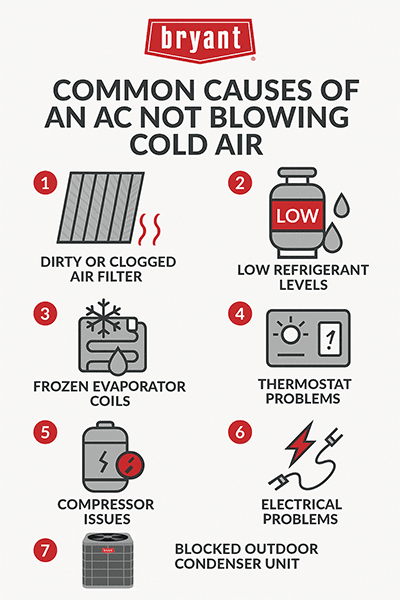
Credit: www.bryant.com

Credit: diy.stackexchange.com
Frequently Asked Questions
Why Is My Ac Not Cooling After Thermostat Change?
Your AC may not cool if the thermostat wiring is incorrect or incompatible. Check connections and thermostat settings carefully.
How To Fix Ac Issues After Thermostat Replacement?
Verify proper thermostat installation and correct wiring. Reset the system and ensure the thermostat is compatible with your AC unit.
Can A New Thermostat Cause Ac To Stop Working?
Yes, a new thermostat can disrupt AC operation if improperly installed or incompatible. Double-check installation and settings for errors.
What Thermostat Settings Affect Ac Performance?
Temperature setting, mode (cool/auto), fan setting, and schedule impact AC function. Ensure they match your cooling preferences.
Conclusion
Changing your thermostat might cause AC problems. Check the wiring and settings carefully. Sometimes, a small mistake stops the AC from working. Testing the thermostat helps find the issue fast. Don’t ignore the power supply to your AC unit. Simple fixes often solve the problem without extra cost.
Call a professional if the problem continues. Staying patient and careful saves time and money. Your home will stay cool again soon. Keep these tips in mind for easy troubleshooting.